The Best Apps for Museum Visits, Honestly Compared (2026)
We pointed the popular museum and art apps at the same six works, from The Starry Night to a deliberately bad photo, and noted what each got right, what it charges, and who it’s really for.
For identifying art in front of you, Smartify and Google Lens both recognized all six works we tested. Smartify gives the fuller museum experience but needs an account. Google Lens is free and needs nothing new installed, but there’s nothing to save afterwards. Google Arts & Culture and Bloomberg Connects are good for browsing and planning, not for identifying what you’re looking at. AI art-scanner apps with subscriptions are mostly built for valuing art you own.
How we tested. In November 2026 we installed each app on an iPhone and pointed it at the same six works: The Starry Night, Vermeer’s The Milkmaid, Caillebotte’s Paris Street; Rainy Day, Eva Gonzalès’s lesser-known A Box at the Théâtre des Italiens, Degas’s sculpture Little Dancer Aged Fourteen, and a deliberately bad photo of The Milkmaid: cropped by a third, shot at an angle, with glare. We used free tiers only and didn’t start any paid trials. We noted what each app recognized, what it told us, what it costs and what you can do afterwards.
A disclosure: we make Opus, a museum app, and it’s at the end of this list, clearly marked. We haven’t scored it against the others, for the obvious reason.
At a glance
| App | Identifies art from a photo | Cost | Save or review what you saw | Best for |
|---|---|---|---|---|
| Smartify | Yes: all six, live camera only | Free with account; some paid tours | Save and like | Identifying works while you’re in the museum |
| Google Lens | Yes: all six | Free, with shopping results | No | A quick answer from a photo |
| Google Arts & Culture | No camera identification found | Free | Save works | Browsing and learning at home |
| Bloomberg Connects | No | Free | Favorite museums | Free official guides to specific venues |
| ArtScan (AI scanner) | Yes | 7-day trial, then about $40 a year | Reports | Collectors valuing their own art |
| Magnus | Couldn’t test (waitlist) | n/a | n/a | n/a |
Smartify: the best dedicated museum scanner
Smartify recognized all six works, including the awkward photo. Each result is a proper museum record: title, artist, a written description and an audio description, date, medium and size, and the museum that holds it. It’s the closest thing in this test to having the wall label and the audio guide in one place.
The catches:
- You need an account before you can scan.
- It only scans with the live camera. We couldn’t identify a work from a photo already in the camera roll, so it’s for when you’re standing in front of the piece, not for the photo you took last week.
- Some content is paid or promotional: premium audio tours, ticket-booking links, museum promotions, and a link to buy a print of the work.
- You can save and like scans, but not write anything. There’s no place for your own thoughts on what you saw.
Choose it if you want the most information on the spot, inside the museum.
Google Lens: free, fast, and forgettable
Lens also recognized all six. Because it pulls from everything Google has indexed, a famous work brings back more detail than any museum app: articles, the museum’s own page, related works. For a lesser-known painting, what you get depends on what’s online about it.
It’s still a search engine, though. Results come mixed with sponsored products and shopping links, often posters of the work, and there’s no way to save, rate or return to what you found except by digging through your search history.
Choose it if you want a free answer and don’t need to remember it later.
Google Arts & Culture: great for browsing, not for identifying
Arts & Culture is a huge, free library of art and museum content. It’s also one of the most scattered apps we tried: the home feed mixes art with sports, fashion, podcasts, news stories and creative tools.
For art specifically, each work has a clean page with title, artist, date, medium and other details, a save button, and on some works a related podcast. Some works offer an augmented-reality view that places them in front of you through the camera. It was occasionally glitchy, but it’s a lovely way to see scale.
What we couldn’t find was a way to identify a work from the camera or a photo. You search by text, so it can’t help with a painting you can’t name.
Choose it if you like browsing art at home or reading up before a trip.
Bloomberg Connects: free official guides, by venue
Bloomberg Connects hosts free digital guides from a long list of museums, galleries, gardens and cultural sites, more than 1,000 by the app’s own count. It’s a directory of venues, and what’s inside each one is up to that venue. The guides we opened leaned towards events, exhibitions and visitor information rather than the collection itself. Your mileage will vary by museum.
There’s no artwork recognition and no social side: you can favorite museums, and that’s about it.
Choose it if the museum you’re visiting has a guide on it. Check before you go, because some museums use it as their official audio guide.
ArtScan (and other AI art scanners): built for collectors
Search the App Store for “art identifier” and you’ll find a crowd of AI scanner apps with subscriptions. We tried ArtScan as a representative. To be fair to it, it has a clean design, a camera scanner and good artwork details, plus explainers on famous works.
But its focus is price: valuation guides, reports and what a work might be worth. There’s a 7-day free trial (or a first month for $0.99), then about $40 a year. That’s reasonable if you’re trying to understand a painting you own, and poor value if you just want to know what you’re looking at in a museum. Discovery, travel and talking about art aren’t what it’s for.
Choose it if you collect, or you’re curious about something hanging at home. For valuations that matter, you still need a qualified appraiser.
Magnus: couldn’t test
Magnus, the long-running art scanner known for showing prices, had a waitlist when we tried it in November 2026, so we couldn’t include it.
Opus (ours): recognition plus a record of what you saw
We built Opus because none of the apps above does the second half of a museum visit: remembering what you saw and what you thought of it. Here’s what it does, plainly:
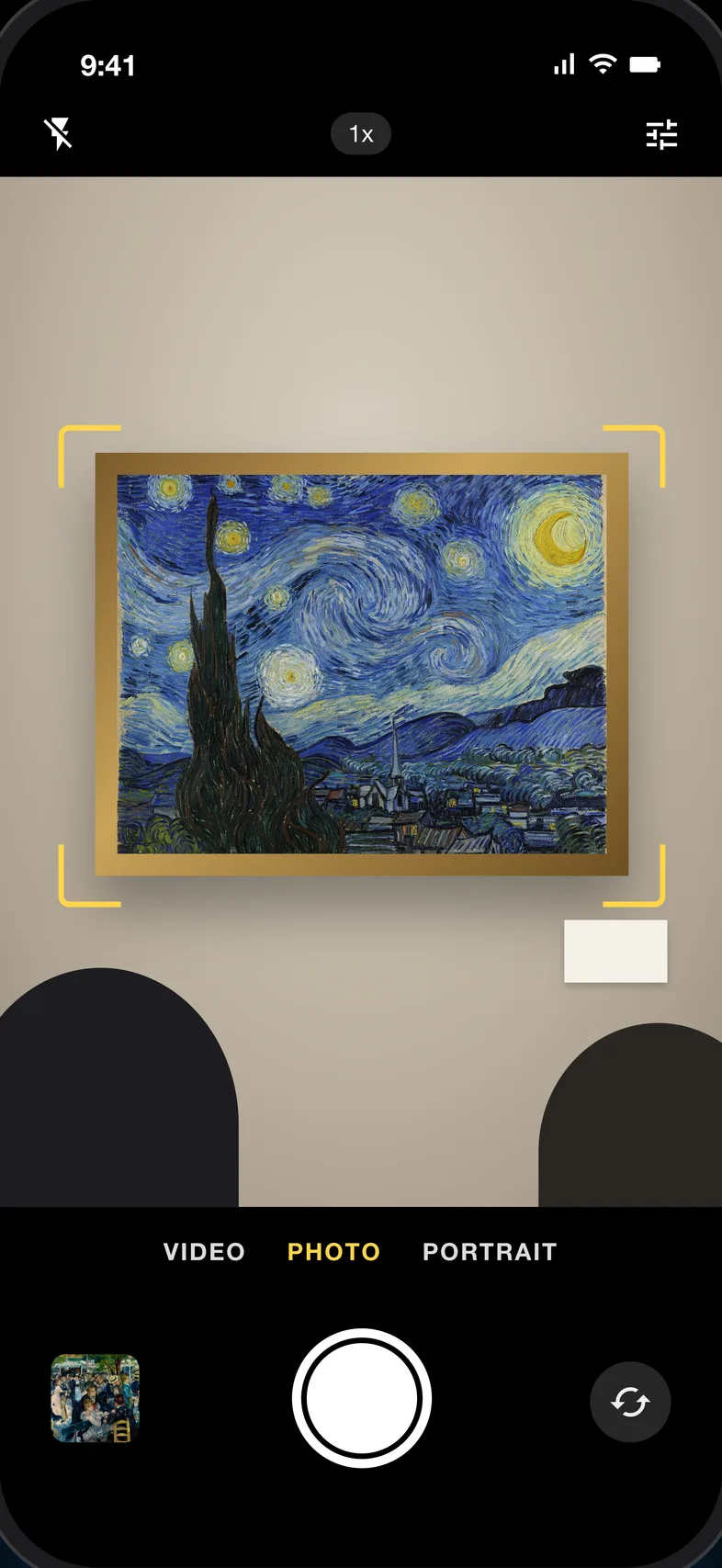
- Recognizes paintings, sculpture and objects from the live camera or a photo in your library, with the artist, the work and the museum that holds it.
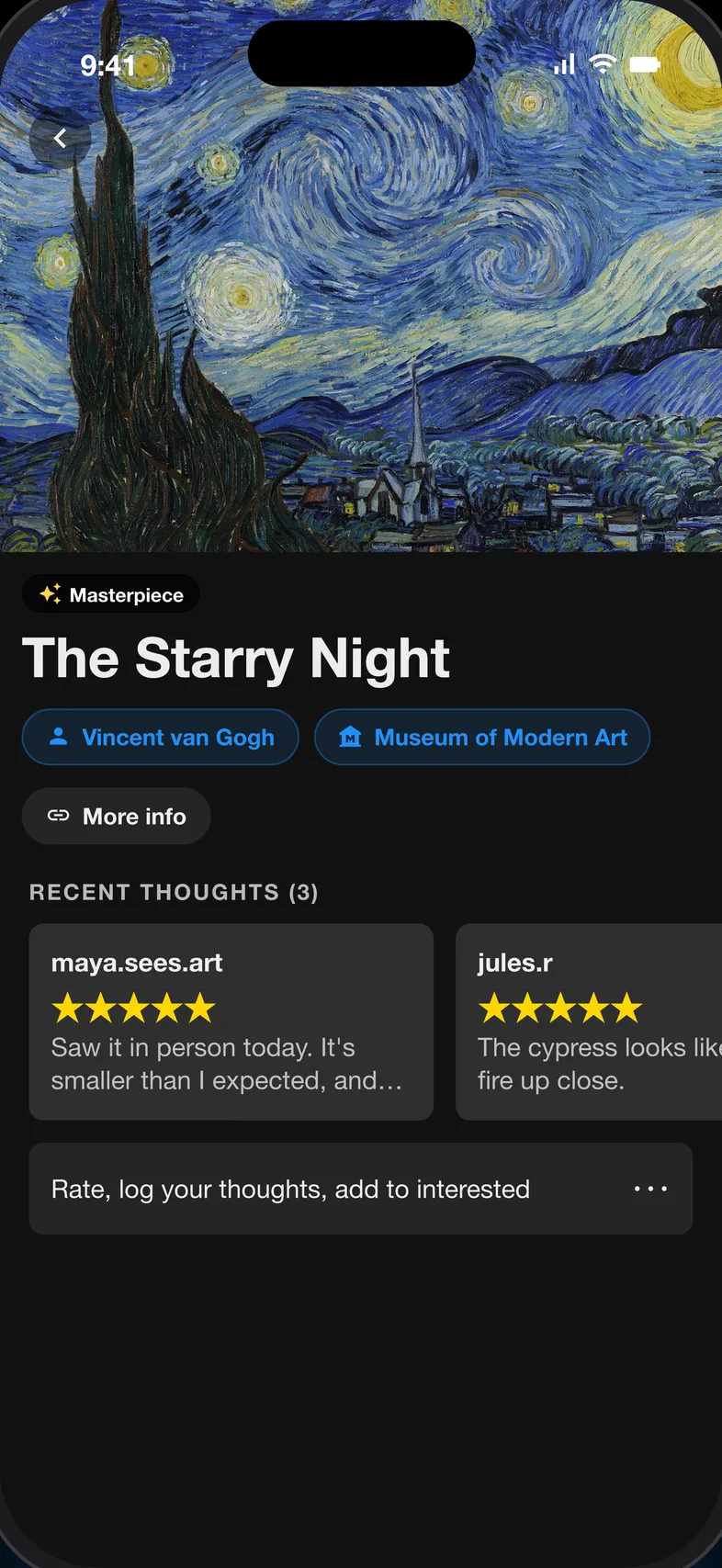
- Lets you rate and review works and exhibitions, and follow friends to see what they loved, a bit like Letterboxd for art.
- Helps you plan: masterpieces and hidden gems by city, what’s on near you, and a map of museums.
- Keeps your record: saved works, artists, museums and exhibitions, your visits, and badges along the way.
The honest limits: Opus is in testing, so you need an invite, and we haven’t put our own recognition results in the table above. Judge it the way we judged the others: point it at something and see.
Which should you use?
- Standing in front of a painting: Smartify, or Google Lens if you don’t want another account.
- Identifying a photo you took earlier: Google Lens.
- Planning a museum visit: check if the museum is on Bloomberg Connects, and browse Google Arts & Culture for background.
- Valuing a painting you own: an AI scanner like ArtScan as a starting point, then a real appraiser.
- Keeping a record of what you saw and what you thought: none of the established apps does this well. That’s the gap Opus is built for.
Whichever you pick, photograph the wall label too. Every app we tried got the famous works right, but a label photo is the one record that never misidentifies anything. For more ways to identify a work, see how to identify a painting from a photo.
Frequently asked questions
What is the best app to identify art in a museum?
In our November 2026 test, Smartify and Google Lens both recognized all six works we tried, including a cropped, angled photo with glare. Smartify is built for museum visits, with descriptions, audio and the holding museum, but needs an account and scans only with the live camera. Google Lens is free and works from photos you’ve already taken, but it’s a search engine: nothing to save or come back to.
Is Smartify free?
Scanning and the standard information on each work were free in our test, but you need to create an account. Some audio tours are sold as premium, and the app links to ticket bookings and prints.
Can Google Lens identify paintings?
Yes. It recognized all six works in our test, from The Starry Night to a lesser-known Eva Gonzalès and an angled, cropped photo. Expect sponsored shopping results alongside the answer, and no way to save or review what you found.
Does Google Arts & Culture identify paintings from a photo?
We couldn’t find a feature that identifies a painting from your camera or a photo. You can search by text, save works, and for some works view them in your space through the camera.
Is there an app to rate and review art I’ve seen?
None of the apps we tested lets you write about what you saw. Smartify lets you save and like scans. Opus, which we make, lets you rate and review works and exhibitions and follow friends.
Early access
Take Opus on your next trip.
Know what you’re looking at from a photo, then find the masterpieces, hidden gems and exhibitions near you. We’re letting testers in now.